Know what your org really costs, builds, and needs.
Squado puts headcount, allocation, and real cost per squad, tribe, and alliance on one live canvas. Ask the question at 9:02. Answer it at 9:03.
- "What does the Payments tribe cost this month?"
- "Is anyone split across squads without us noticing?"
- "The org chart is out of date. Again."
Free for 14 days, and the demo opens without an account.
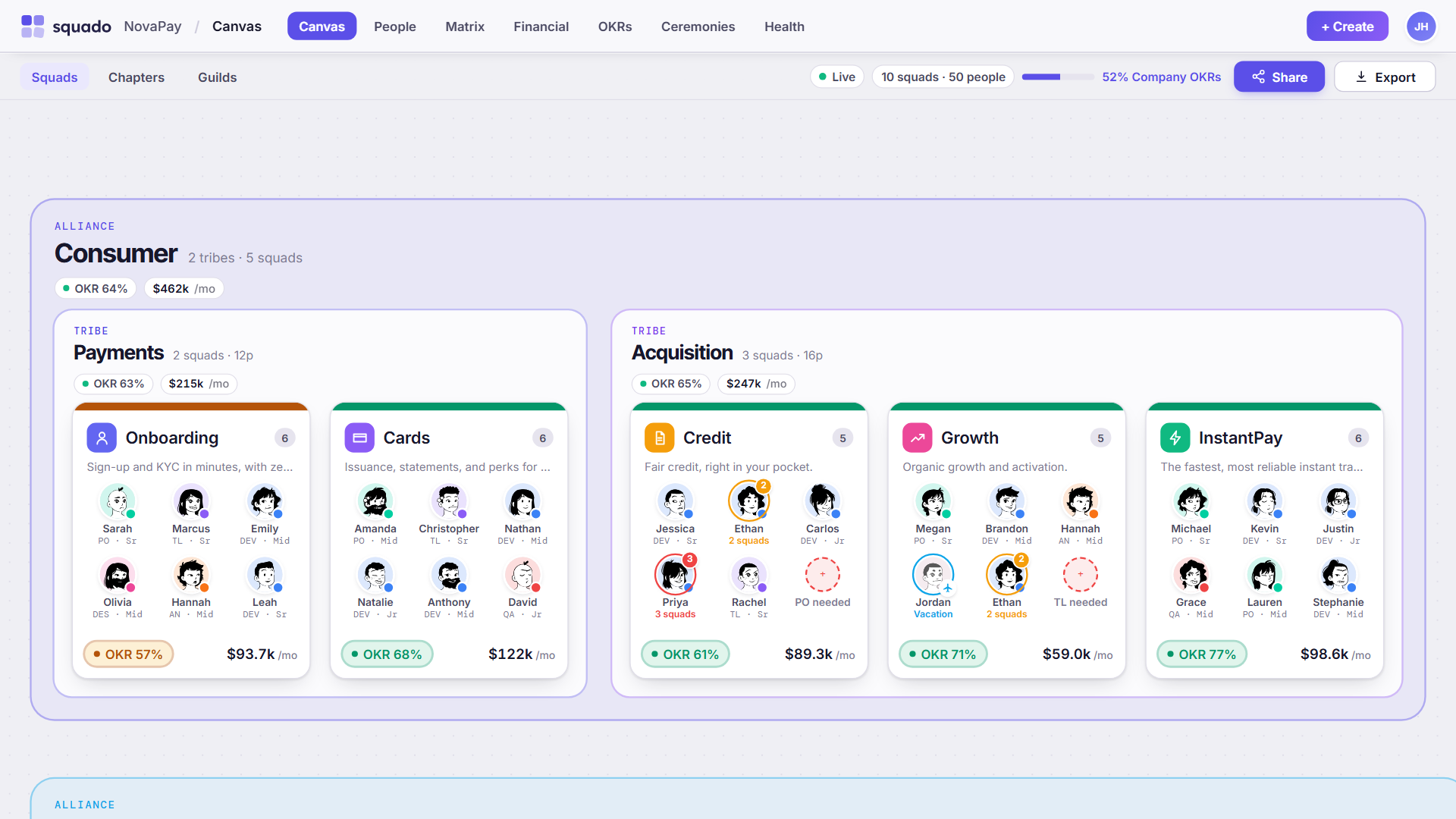
NovaPay is a demonstration organization. Its people and figures are sample data, not a customer.
Move people between teams, and see who is carrying what
Structure is the easy half. The hard half is who is away, who is split across two squads, and which seat is still empty. Drag someone into another squad and choose whether they transfer or stay on both. The signals then ride on the faces, on the canvas you already have open, instead of in a status sheet nobody updates.




These four are from the NovaPay demo, with the signals they carry there. Empty seats work the same way: each squad declares the roles it needs, and Org Health flags the ones nobody is filling.
Five surfaces, one model underneath
Change the org once and all five stay current, because none of them is a separate document.
The org chart that cannot go stale
Squads, tribes and alliances on a live drag-and-drop canvas. Reassignment is a gesture, not a ticket. You work on the canvas itself, so it cannot fall behind the org it describes.
- Squad cards carry members, roles and capacity gaps
- Drag squads between tribes and the change is immediate
- Filter by role to highlight people across the org
- Chapters and guilds cut across squads, so you can see where a skill sits
- Executive mode for leadership presentations
Objectives that reach the squads doing the work
Custom cycles from company level down to squad, with check-ins that record confidence instead of a colour. Every objective stays linked to the teams executing it.
- Company, tribe and squad levels in one cascade
- Confidence tracked per check-in, with history
- Unlimited cycles on your calendar, not ours
What this tribe costs, answered in seconds
Exact monthly cost per squad, tribe and alliance, computed from a rate matrix by role and seniority. Every total opens into the rows that produced it, so the number survives the question that follows it.
- Rate matrix by role and seniority
- Cost rolls up through squad, tribe and alliance
- Per-person visibility switch on financial data
- Export the view finance asked for
Problems surface while they are still cheap
A scored dashboard reading the same structure: uncovered roles, people allocated past capacity, teams running without a lead. You find out the week it happens, not at the retro six weeks later.
- Uncovered required roles flagged as they appear
- People carrying more squads than their capacity allows
- A single score you can take into a leadership meeting
One calendar that reconciles when people move
Every recurring meeting populated from the squad, tribe, chapter or guild it belongs to. When the org changes, hit sync and the roster catches up. No calendar integration required.
- Daily, weekly, biweekly and monthly cadences
- Participants auto-populate from the linked entity
- Conflicts and double-bookings detected on the grid
- Chapters and guilds link ceremonies across tribes
Your teams' time is your biggest expense. Now you can see it.
Every squad's ceremonies in one calendar, with clashes flagged on the grid. Open a squad and you get each person's meeting hours for the week, priced from your own role rates.
Growing an org without a live model is expensive
Every week you make staffing decisions against a picture of the org rather than the org itself. These are the four failures that picture guarantees.
"Nobody trusts the org chart enough to decide from it."
Updated quarterly, stale by Monday. A drawing has no idea when it stopped being true.
"We wrote the OKRs in January. Nobody has looked since."
Confidence goes untracked, and the squads executing the work cannot see which company goal they are attached to.
"Finance asked what the tribe costs. That took two days."
Four systems, one pivot table, and you still are not certain the number is right when you send it.
"The role sat empty six weeks. I found out in the retro."
By the meeting where it surfaced, the cost of the gap had already been paid.
From a spreadsheet to a live org
Setup time is the fair objection. Here is the whole path, with nothing skipped.
Paste what you already have
Upload or paste the sheet your org already lives in. It does not need cleaning first, and column names do not need to match anything.
AI maps it onto your structure
Import reads your headers and values, maps them onto roles, seniorities, squads and allocations, then shows you the mapping before anything is written. You correct what it got wrong.
Start with a single tribe
Put one tribe on the canvas and work from it. The rest of the org arrives whenever you are ready, and nothing has to be redone when it does.
AI org import is included on every plan, Starter upward.
Flat rate per org. Never per seat.
Put the whole company on the canvas. You pay by squads, so adding people never costs more.
- Org canvas: alliances, tribes and squads
- Chapters, guilds and custom roles
- Ceremony calendar with conflict detection
- Org health dashboard
- AI org import
- Public read-only sharing, with an optional password
- Audit log
- Export to PNG
- 1 editor, unlimited viewers
- Everything in Starter
- OKR cascade with unlimited cycles
- Financial matrix with role rates
- Export to PNG, PDF and PowerPoint
- 3 editors, priority support
- Everything in Growth
- SSO and SAML
- Dedicated support and onboarding
- SLA guarantees
- 10 editors plus API access
Every plan starts with a 14-day free trial that runs on Growth limits, so you can try OKRs and the financial matrix before choosing.
What buyers ask before they sign
I lead several teams. Keeping the real picture current was the hard part.
I'm an engineering manager, and in any given week I'm responsible for several development teams at once. The thing I could never keep current wasn't the code, it was the shape of the org itself: who sits where, what each team was carrying, and what it cost.
That answer lived scattered across spreadsheets, a wiki page, and a few Slack threads, and it was already out of date the moment I finished putting it together. Every quarter I rebuilt the same view by hand.
Squado is the tool I wanted for my own teams: one live canvas where structure, demands, and cost stay true without a weekly rebuild. If you run squads and tribes, I think it will save you the same afternoons it saved me.

One canvas. Always current.
Sign up, paste your people from the spreadsheet you already have, and watch your first tribe appear. No sales call and no IT ticket to find out whether it works for your org.